Start for free

How to manage your Amazon Flex income and taxes with Accountable

Written by: Sophia Merzbach

Updated on: November 13, 2024

Reading time: 5 minutes

Logo RB
The private delivery service Amazon Flex is a quick and easy way to make some money on the side. But as a delivery driver, you are considered a tradeperson and as such, you need to pay income tax if your earnings exceed the tax free threshold. Luckily, Accountable is here to help you organise your finances! Read on if you want to find out how you can use our free app to keep track of your incoming and outgoing Amazon Flex payments and be smart about your taxes.

What is Amazon Flex?

Amazon Flex is a private delivery service, allowing anyone who passes their security checks to sign up and deliver packages for Amazon. So, basically, it is Uber for packages. All you have to do to sign up is download the app, pass their security checks and start delivering packages. You are your own boss and can decide when, where and how often you want to drive for Amazon Flex. However, delivery drivers are considered to be Gewerbetreibende (traders) in Germany and as such, need an official trade license. You can apply for a trade license, or Gewerbeschein, at your local trade office.  💡 Tip from Accountable: You can find some more helpful information about registering as a tradesperson in this article.

Do I have to pay taxes for my Amazon Flex income?

According to Amazon Flex, every driver is responsible to obey tax laws and to determine their own tax obligations. This means that you are responsible to declare your income to the German tax office and pay income tax for the money you make via Amazon Flex, if the total sum of your income exceeds the tax free threshold of 9,744€ (as of 2021).  No reason to panic though! You can use our smart mobile app to optimise your accounting and your taxes. Simply follow the next steps and start making some extra money with Amazon Flex! 💡 Tip from Accountable: Download the Accountable now! Simply add your phone number and get a download link for the app.

Accounting and taxes for Amazon Flex: This is how it works

1. Register with Amazon Flex

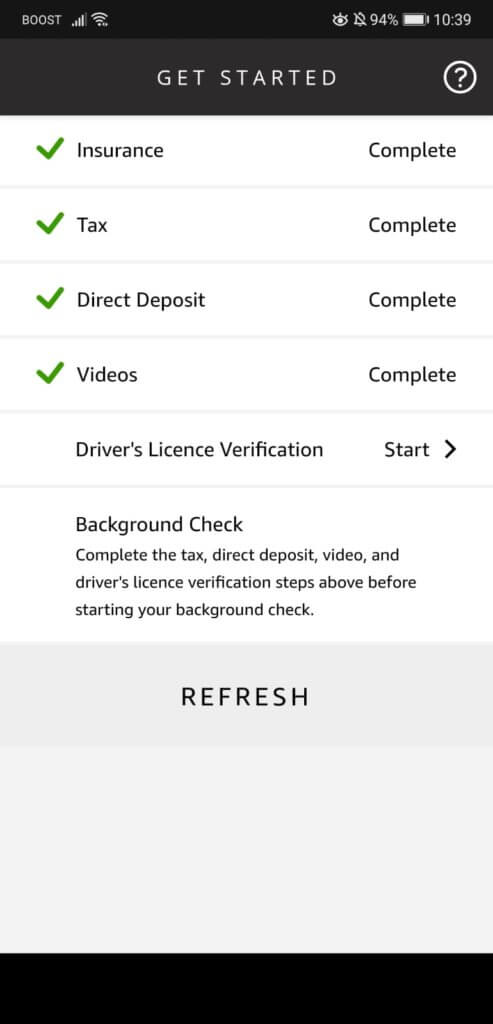
First things first: You have to download the Amazon Flex app and set up your account. You can link this account with your current Amazon profile or start a new account, adding some personal details like your name, your address and your phone number. You also have to add some information about your insurance, provide details about your current tax status (business or private, tax number etc.) and add your bank details for future payments. In addition to that, you will have to watch a few videos explaining the delivery process of Amazon Flex and, finally, verify your driver’s license, before you can move on to the final background check.
2. Start making money with Amazon Flex

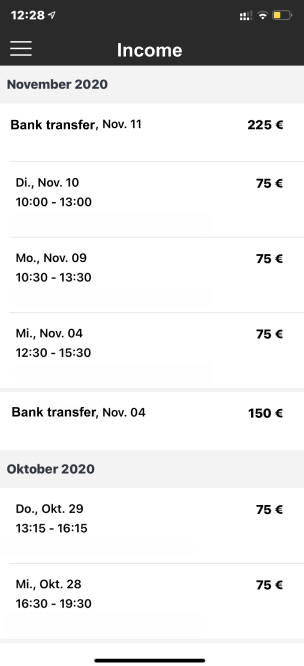
Once you’ve passed the background check, you can start delivering packages for Amazon Flex. For each delivery, you will see the amount Amazon is paying you to complete it. You can track your payments via the earnings screen in the app. This is also where you can find an overview of your total earnings that have been paid into your account.
3. Add income in Accountable

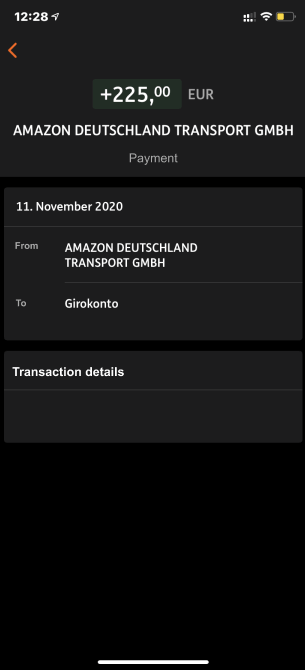
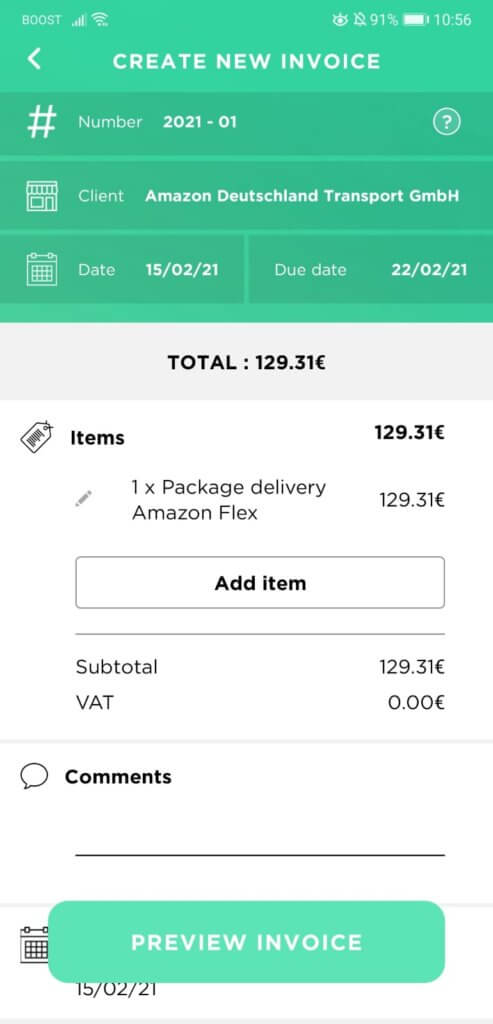
You can take these earning statements and upload them to Accountable to keep track of your payments. You can choose to add the details manually, upload a photo or a PDF, import it via email or scan the photo yourself. The information from your earnings will automatically be added to your overall tax details, which you can find in the app navigation under taxes. You can use this information to quickly and easily submit your VAT return

4. Keep an eye on your business expenses

If you are a driver for Amazon Flex, there are certain expenses you have in order to complete your deliveries. This includes paying for petrol or car insurance. You can use these expenses to minimise your tax load, so don’t forget to add them in Accountable.

Car insurance and company car

In order to drive for Amazon Flex, you need to have personal automobile insurance for your vehicle. But in some cases, it might be worth looking into an additional commercial insurance for your car. You should contact Amazon Flex directly if you have any further questions about your insurance. You should also keep in mind that your vehicle will be considered a company car if business usage exceeds 50% of your total usage of the car. If you use a company car for personal trips, you have to pay additional taxes, as this is considered to be a donation in kind, which must be declared in your income tax declaration. In this case, you are left with two options: You can use the so-called one-percent-rule (Ein-Prozent-Regel) or track the usage of the car via a logbook.

The one-percent-rule

The one-percent-rule is a flat-rate calculation of the personal benefit of a company car. It states that private use of a car can be set at one percent of the gross list price for each month, including for rented or leased vehicles. With a list price of the company car of, for example, 50,000€, the monetary benefit of 500€ monthly wage tax is payable.

The logbook

Alternatively, you can also choose to keep a logbook, entering every trip and the reason (private or business) for it. Here’s an example: You are making 24,000 km a year with your company car. 3,600 km are for personal use. The total sum of expenses for the private usage of the car (including petrol, maintenance, insurance etc.) is 6,000€. This equals 0.25€ per kilometer (6,000€ ÷ 24,000 kilometers) and results in an additional 900€ (0.25€ per kilometer x 3,600 kilometers) you have to add to your annual taxable income.

Conclusion

Delivering packages for Amazon Flex is an easy way to make some extra money while still being highly flexible. But since delivery drivers are considered tradespeople, you have to register for a trade license and pay income tax if the total sum of your earnings exceeds the tax free threshold.  Our free app is an easy way to keep track of your income and your expenses. And in addition to that, Accountable will also help organise your taxes and submit your VAT return directly in the app.

Neues E-book über den Einstieg in die Selbstständigkeit

20 Kapitel knallhart recherchiert und vom Steuerprofi geprüft

Kostenlos herunterladen

Sophia Author

Author - Sophia Merzbach

Sophia has been a key member of the Accountable team for many years, bringing a unique blend of journalistic precision and in-depth tax expertise to her work.

Who is Sophia ?

Did you find what you were looking for?

You might also like

An overview of the different tax classes

How much income tax is deducted from your income is largely determined by your tax class. There are ...

Read more

Income tax for freelancers – how much tax do I have to pay in Germany?

Working as a self-employed professional has many advantages: You are your own boss and you can choos...

Read more

What is the Reverse Charge procedure and how does it apply to you?

Working with international clients can be tricky, depending on where exactly they’re located, whet...

Read more

Hear it straight from our users

Prompte Beantwortung 🙏

Birgit Koch

Accountable hat mir den Alltag wirklich spürbar erleichtert. Besonders gefällt mir, dass die App logisch aufgebaut ist und man sofort versteht, wo man was findet. Viele Dinge, die sonst nervige Routine sind, laufen hier einfach automatisch im Hintergrund mit. Was ich besonders gut finde: Man verliert nie den Überblick. Die App zeigt klar, was erledigt ist und was noch ansteht. Belege erfassen geht super schnell. Foto machen, fertig kein ewiges Sortieren oder Nachtragen. Der Support ist wirklich klasse. Ich habe ein paar Fragen gestellt und immer schnell hilfreiche Antworten bekommen. Nicht nur Standardtexte, sondern echte Hilfe. Man merkt, dass die App ständig besser wird. Updates bringen wirklich sinnvolle Verbesserungen, nicht nur Kosmetik. Unterm Strich: Accountable nimmt mir spürbar Arbeit ab und sorgt dafür, dass ich mich weniger mit Bürokratie herumschlagen muss. Genau so soll es sein.

Anonym

Der Kundenservice ist ausgezeichnet, ich bin enttäuscht, dass sie keine E-Commerce-Kunden annehmen.

Anonym

Klasse Service! Persönlich und kompetent.

Anonym

Vielen Dank ich habe zu jeder frage oder Problem eine Lösung angeboten bekommen.

Jamil Hammoud

Tolle Software. Einfach zu benutzen. Fantasticher Customer Service.

Mehmet Baha

Ich bin neu bei Accountable und noch in der Testphase. Bisher konnte ich die App intuitiv bedienen und bei Fragen habe ich eine zeitnahe und herzliche Unterstützung bekommen (Danke, Daniela!:)) Nach aktueller Erfahrung, würde ich Accountable immer weiterempfehlen.

Monika Sorban

I love the simplicity of the app, and especially the customer support. I havent used the app a lot, but i will for sure recommend.

Argir Popov

It was clear, friendly and supportive

Carlo Loiudice

Accountable ist super modern gestaltet und sehr gut durchdacht. Besonders hervorhebenswert ist, dass es viele Tools in einem vereint: Buchhaltung, Geschäftskonto, Steuererklärung, Steuerberatung und vor allem der automatische Rechnungsversand ist super praktisch. Ich kann es nur empfehlen!

André Schröder